Saturday, March 21, 2009
LCD thermometer
Build your own temperature meter for fun. This project uses the Microchip TC77 digital temperature sensor, a PIC16F871 microcontroller and a 7-segment 3˝ digit LCD. You can study the source code on how to drive an LCD display.


Monday, March 16, 2009
Connect your microcontrollers into a network
 Connect your PIC devices on a shared network, and they can communicate to each other and share information. You can control them all by any unit on the network.
http://jap.hu/electronic/pbus.html
get started with PIC microcontrollers
 Are you new to microcontrollers? Microchip 8-bit PIC microcontrollers are cheap and easy to start with. You can find them in many size starting at 6 pins. Most parts contain FLASH program memory, so they can be programmed hundred times. A good choice to start with is the 40-pin PIC16F887, or the 18-pin PIC16F628A/PIC16F818. They contain integrated serial interface, timers, PWM module, AD converter and separate EEPROM to store your own data.
- Choose your PIC: read the datasheets and application notes at www.microchip.com
- Get your PIC programmer or build one
- Download the MPLAB IDE
- Build a PIC circuit and study how it works
- Make modifications, or build your own application
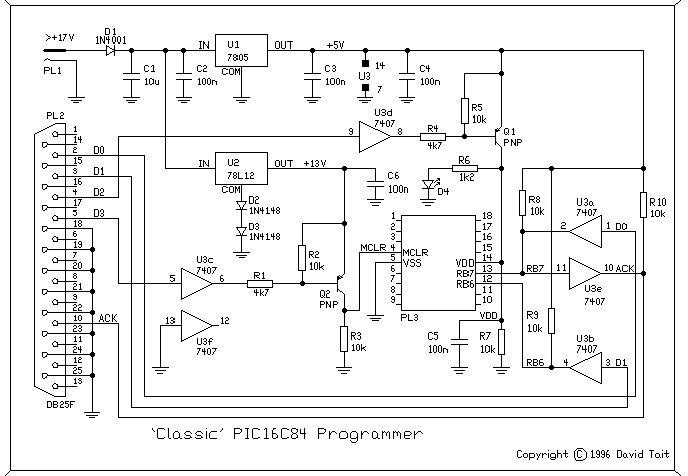
The easiest is getting a Microchip ICD or PICKIT. I have built a DTait programmer. This programmer can work with several software: DL4YHF's PIC programmer, ic-prog, PicProg, and various Linux programmers.
Development environment
The MPLAB IDE is the development environment for writing, compiling, debugging, programming all the PIC devices at the same place.
Find PIC circuits
You can find several circuits on my site here, or you can check the PIClist mailing list.
Monday, March 9, 2009
Turn on the aquarium lights every day at the same time
Turn on the sprinkler or the aquarium lighting for the same period of the day. You can choose to operate the output by every 2nd, 3rd day only. There is a manual start/stop button to immediately turn on or off the output, and a disable button to completely turn off automatic operation.
Serial LCD for microcontrollers using only 3 pins
 Connect an LCD to your microcontroller to make it easy to develop and debug your application. You can choose which PIC I/O pins you want to use for the interface, and any HD44780 compatible LCD can be controlled.
http://jap.hu/electronic/lcdif.html
Lights timer
Automatically turn off the lights ater 10 minutes. If you often forget to turn off the lights outside or at different places in the house, this circuit can be practical for you. It can control two independent light switches with different turn off times. Press the button once and the light turns on for the preset time. Press again, and the light remains on forever. Press for the third time, and the light turns off.
http://jap.hu/electronic/lamp.html
http://jap.hu/electronic/lamp.html
Remote control transmitter - control devices from the PC
Control all your devices from the PC. This infrared remote control transmitter can be controlled from the PC serial port. It speaks different remote control formats, like the Philips RC-5 standard and can be tailored to other specific types.
http://jap.hu/electronic/irtx_pic.html
http://jap.hu/electronic/irtx_pic.html
Remote control - build your own
 Control up to 8 devices by this easy constructable remote control. It can work as a radio or infrared remote control, depending on the components. Each device output can be configured to be momentary (turned on while you press the button) or latched.
Latched outputs can be toggled on/off by one button per channel, or turned on and off by two buttons per channel.
http://jap.hu/electronic/codec.html
Combination lock
 Operate your gate or something different by this simple electronic combination lock. The combination can have a chosen length of numbers or alphabets, and can be changed any time. The LCD display is optional, the circuit works fine without it. After entering the correct combination, a relay is operated for the predefined time.
http://jap.hu/electronic/combination_lock.html
Parallel port logic analyzer

A really simple logic analyzer for the parallel port. An even simpler version of the schematic contains no active parts at http://www.xs4all.nl/~jwasys/old/diy2.html
For Linux, I use the fabulous logic analyzer. Windows software is available at the first link.
http://akikorhonen.org/projects.php?action=view&id=59
Turn the PC into an oscilloscope

http://www.geocities.com/lptscope/
Subscribe to:
Comments (Atom)