Are you new to microcontrollers? Microchip 8-bit PIC microcontrollers are cheap and easy to start with. You can find them in many size starting at 6 pins. Most parts contain FLASH program memory, so they can be programmed hundred times. A good choice to start with is the 40-pin PIC16F887, or the 18-pin PIC16F628A/PIC16F818. They contain integrated serial interface, timers, PWM module, AD converter and separate EEPROM to store your own data.
- Choose your PIC: read the datasheets and application notes at www.microchip.com
- Get your PIC programmer or build one
- Download the MPLAB IDE
- Build a PIC circuit and study how it works
- Make modifications, or build your own application
ProgrammersThe easiest is getting a Microchip ICD or
PICKIT. I have built a
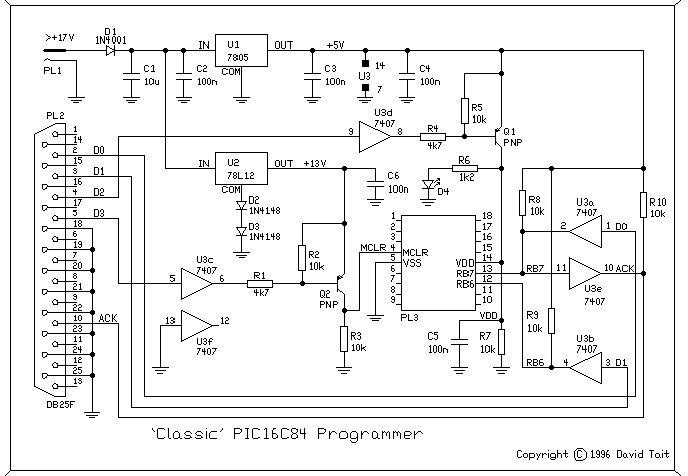
DTait programmer. This programmer can work with several software:
DL4YHF's PIC programmer,
ic-prog,
PicProg, and various
Linux programmers.
Development environmentThe
MPLAB IDE is the development environment for writing, compiling, debugging, programming all the PIC devices at the same place.
Find PIC circuitsYou can find several circuits on my site
here, or you can check the
PIClist mailing list.
 Control up to 12 digital input/output lines from the computer by this USB circuit. Each line can be individually set to an input or output, and each output pin can be set HIGH or LOW independently, without changing other output pin states